4 minute read · Practical field guide
A quick reply should become useful information
Consider a supplier confirming a delivery window. The customer texts that receiving closes at 3 p.m. If the reply lives only on one employee’s phone, the logistics team may never see it. If the conversation is correctly connected to the account, the team has a better place to find the answer.
This is a proposed workflow, not a promise that every connector does it automatically. In a demonstration, follow a specific reply into the CRM and check which record, task or conversation receives it.
Keep the customer’s side uncomplicated
The business may organize its work with accounts, contacts and assignments. The customer can still answer a simple question in an agreed text conversation. They do not need to navigate that internal structure just to confirm a time or identify a purchasing contact.
Use SMS when a short exchange fits the task, or a supported iMessage workflow when richer messaging is useful. The important outcome for the administrator is that the resulting answer reaches the right place and a colleague can act on it.
Use one complete example in the demo
Set up a test contact with an account and an open order. Send a brief confirmation, receive a reply and hand the work to another colleague. Ask that colleague to explain the current arrangement using the CRM record.
Check whether they can see the exact reply, the sender, when it arrived and who owns the next action. Then change the assigned colleague and repeat. This can expose a connection that records a message successfully but leaves the actual work unassigned.
Start with the field people already need
Choose one useful outcome, such as a confirmed visit time or a request for a callback. Decide whether a person will update the relevant record or an approved automation can do it. Keep ambiguous replies available for someone to interpret.
Avoid making a large collection of new fields before the team has used the workflow. Start small, check unmatched replies and confirm that stopped conversations stay stopped. When the mapping and ownership are clear, the integration can reduce routine copying and make a short text valuable to more than the employee who first saw it.
Follow an order update through the record
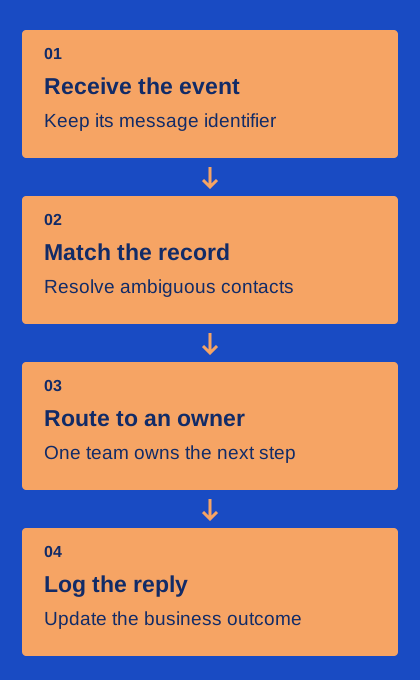
Consider a fictional distributor using its CRM to coordinate customer orders. A warehouse event says that order 72 is ready. The connector finds the correct customer contact, starts an expected update and records the outbound message identifier. When the customer asks to delay collection, the reply belongs with the same order and reaches the person who can change the plan.
That journey contains several separate mappings: order to company, company to contact, contact to messaging destination and conversation to staff owner. A connector that logs a text somewhere in the CRM has completed only part of the job. During evaluation, inspect the exact record, ownership and event history after a normal reply and after a change request. Screenshots of an activity feed are not enough to establish the workflow.
Make a customer reply change the next action
An incoming text should do more than add activity volume. If the customer cancels a visit, the relevant reminder needs to stop. If they ask for a revised quantity, a named person needs a task to check availability. Define these effects explicitly, with the business record remaining authoritative for the order or appointment.
Keep transport status separate from business status. A delivered receipt does not turn a proposal into an accepted order. A reply containing “yes” requires context before it changes a stage. Where automation is uncertain, create a review task and preserve the pending state instead of making an irreversible assumption. The CRM should show what has actually been decided, who decided it and what still needs attention.
Choose an integration owner after launch
A connector can work during setup and drift later when a field, workflow or staff role changes. Assign someone to maintain the mapping and review errors. Keep a short record of required fields, routing rules, duplicate handling and the systems that control communication preferences. This gives a replacement administrator a way to understand the integration without reverse-engineering a series of automations.
Check a small sample of complete conversations regularly: outgoing event, received reply, owner action and final record update. Include exceptions, not only successful sends. Ask whether the system still prevents stale reminders and whether unresolved messages are visible to staff. The value of CRM texting comes from dependable context and follow-through, not from the number of activity rows created.