4 minute read · Brand comparison
Both purchases leave equipment in your operating plan
myCRMSIM and iBluSend are worth comparing when a business wants to connect its own devices and numbers to a CRM. That changes the buying exercise. You are not simply purchasing a hosted number and delegating all device upkeep. You need a plan for the equipment, accounts, carrier service and person who can restore the connection when it stops working.
The facts here come from the providers’ pages checked September 28, 2026. myCRMSIM’s requirements table lists an iPhone, SIM and Mac for its iMessage product. iBluSend also requires customer-owned compatible Apple equipment. Those are product requirements to confirm before purchase; our operational checklist is suggested evaluation work, not a report that either integration has passed a hands-on test.
| Decision | myCRMSIM | iBluSend |
|---|---|---|
| iMessage price basis | $29 per line/month for 1–10 lines | Solo $39/month; Starter $79/month |
| Relevant equipment | iPhone, SIM and Mac listed | Compatible Mac and iPhone required |
| Starter comparison | Budget for the needed number of line licenses | Starter includes two iMessage lines |
| Developer access | Confirm the required connector and API arrangement | Solo excludes API; Starter lists 10,000 events/month |
| Cost outside software | Devices, carrier and maintenance | Devices, carrier and maintenance |
Choose the channel product before comparing licenses
myCRMSIM presents several channel products with different device requirements. Do not copy an Android SMS description into an iMessage implementation plan. Ask for the setup instructions and current requirements for the exact channel and CRM you intend to use. Establish which device sends, which account owns the number and what component transfers the reply back into the customer record.
Its per-line licensing can make a small configuration straightforward to estimate. Two iMessage licenses at the displayed monthly rate imply $58 in software charges before the separate operating costs. That arithmetic does not prove the two-line configuration supports your desired integration behavior. An inexpensive license still needs to pass the same record-mapping and reply-handling checks as a more expensive bundle.
iBluSend’s tiers change more than the number of lines
iBluSend’s Solo tier has one iMessage line and one CRM workspace, but excludes API access. Starter includes two iMessage lines and a stated webhook/API-event allowance. If your application needs those interfaces, comparing Solo’s headline price against another developer-enabled configuration misses a material part of the requirement. Select the tier first, then estimate the cost.
The site describes integration-specific capabilities and conditions for its HighLevel tools. Have the supplier confirm your own account arrangement rather than assuming a sub-account receives every feature shown in a demo. Also ask what consumes an API or webhook event. A conversation can produce several events, so an allowance measured in events should not be read as an equal number of customer conversations.
Trace one reply from the phone to the record
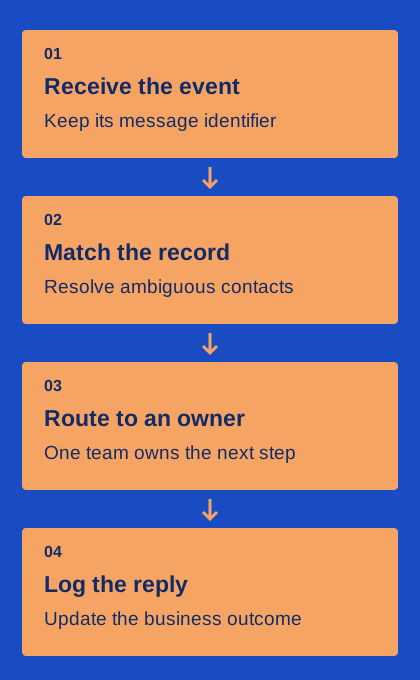
Use a controlled contact with a known CRM record. Send a message through the intended interface, reply from the test recipient and locate that reply in the CRM. Write down the identifiers available at each step: sender line, contact, message and conversation. Then check the same exchange from another authorized staff account. The goal is a history that another employee can understand and continue.
Next, introduce a realistic ambiguity: two CRM records sharing one phone number. Ask which record receives the reply and how staff can correct a mistaken association. Avoid running this experiment on real customer duplicates during the initial trial. A vendor may transfer messages correctly while the CRM’s own matching rules still create an incomplete or misleading customer history.
Give the equipment an owner
Assign someone to power, connectivity, operating-system updates and account recovery. Decide where the equipment lives and who can access it when the usual administrator is away. Keep recovery information in the business’s approved credential system rather than inside an employee’s personal notes. These are ordinary consequences of operating the sending devices, not evidence that either product is unreliable.
Ask each supplier what happens to queued work when a device disconnects and how the CRM displays that state. Can staff tell that a message is waiting rather than delivered? What evidence is available after reconnection? Include a planned maintenance window in the trial if the vendor supports it. Do not turn off production equipment merely to manufacture a fault while customers are depending on it.
Choose the configuration that keeps the record useful
myCRMSIM is a candidate when its channel-specific licensing and connector fit your existing equipment and CRM arrangement. iBluSend is a candidate when its particular CRM surface, line bundle and API tier match the workflow you need. Neither should be presented as cheaper solely from software pricing if the required devices, integrations or staff effort differ.
Finish with a bill of materials and a short operating record: equipment, software tier, carrier, CRM owner, message allowance, event allowance and recovery contact. Attach the successful reply trace. That gives the next administrator something concrete to maintain and makes renewal a review of an understood service rather than a search for why messages stopped appearing in the CRM.