4 minute read · Practical field guide
Choose a sample with real operational variety
Select a manageable set of conversations from normal work and known exceptions. Include incoming and outgoing activity, a changed appointment or order, a shared contact number and a handoff between colleagues. Record why each example is in the sample. A collection containing only successful sends will miss the places where history becomes unreliable.
Use the systems and access controls approved for the data. Keep your audit worksheet focused on identifiers, times, record links and findings rather than copying entire customer threads into another tool. Name the person who can correct a CRM record and the person who maintains the integration. The review needs both operational context and technical ownership.
Define the expected record before looking for it
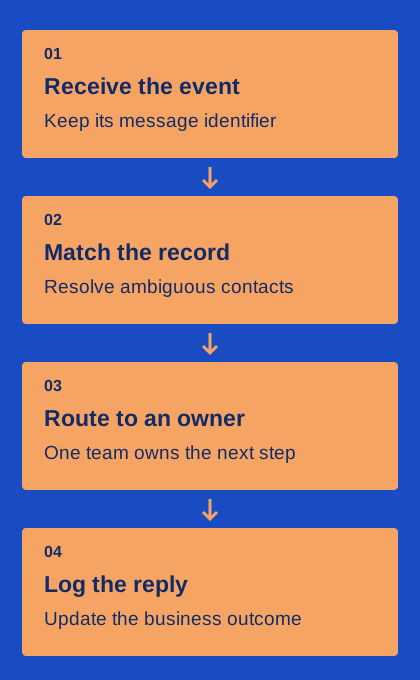
For each sample, identify the customer task and the CRM object where the conversation should appear. Note the contact, company, order or appointment references needed to distinguish it from other work. Check the current ownership rule and whether the record was merged, reassigned or changed after the conversation began.
Write the expected behavior in plain language: “The reply should be linked to order 72 and assigned to the dispatch team.” This helps separate a genuine integration error from a misunderstanding of the configured rule. If the team cannot agree on the expected record, resolve the workflow definition before using the audit to judge the connector.
Trace the event through each boundary
Find the provider-side message or event identifier, the connector’s processing evidence where available and the resulting CRM activity. Compare timestamps with their time zones and distinguish event time from processing time. A delayed write can look like a missing message if the review uses an inconsistent time window.
For every mismatch, state the last confirmed fact. The provider may have received a reply, while the connector rejected a record mapping. The connector may have succeeded, while a staff member is viewing a different CRM object. A trace built from identifiers and record links is more useful than a screenshot of an empty timeline alone.
- Confirm the messaging event exists under the expected business account.
- Find the matching integration attempt and its recorded result.
- Open the exact CRM object and inspect its current owner.
- Check whether later edits or merges changed the visible history.
Classify mismatches by the repair they need
Useful categories include absent activity, duplicate activity, wrong-record attachment, incomplete content and missing ownership. Add a separate category for a correct technical record whose business task remains unresolved. The latter may need an operating-process fix rather than a replay of the integration event.
Choose a repair that preserves traceability. If you relink an activity, retain enough evidence to explain the correction. If you replay an event, first check whether the original already applied part of its work. A replay should not produce a second customer message or duplicate business action. Use the provider and connector documentation to understand the available recovery behavior.
If several duplicate activities share the same event identifier, investigate event handling before merging records. If the identifiers differ, determine whether the business submitted multiple attempts for the same task.
Correct the mapping behind repeated errors
A single corrected note can hide a recurring defect. Look for patterns across the sample: duplicate contacts, a changed field, an unavailable owner or events that arrive after a record is closed. Assign a specific configuration or code change to the person responsible for that boundary. Keep the intended rule with the fix.
Validate the change using the affected scenario and a normal conversation. Include a case that should remain unmatched when the destination is genuinely ambiguous. This checks that a fix has not replaced missing activity with confident but incorrect attachment. When the root cause is a team convention, update the runbook and explain it to the people who handle the queue.
Leave a small reconciliation routine behind
Keep the audit categories, sample method and recovery owners so the review can be repeated after a migration or workflow change. Track unresolved mismatches until the customer task and the technical record are both understood. A dashboard count can help locate work, but staff still need a clear next action for each exception.
Finish the review with what was checked, what was corrected and what remains uncertain. Avoid describing a small sample as proof that every historical conversation is complete. Its practical value is a traceable process for finding and repairing the kinds of gaps that matter to your team. Over time, consistent sampling can reveal whether the same causes keep returning.